Victor Victorious: The Victor 9000 Computer
Table of Contents
from the November 1982 issue of Byte magazine
by Phil Lemmons
Microcomputers are proliferating because they can do so many tasks so well. Each time microcomputers take over another task, they threaten some old technology. As word processors, for example, microcomputers threaten the typewriter. As number crunchers, microcomputers threaten the calculator. Each company whose main product is threatened faces a hard choice: perish or become a computer company. What’s more, such a company must make the right computer on the first try because the fierce competition in the microcomputer market gives few entrants a second chance. The rules permit only one roll of the dice in the game called “You bet your company.”
Victor Business Products has been making calculators for 60 years. Victor saw the need to make a computer, and the Victor 9000 is Victor’s roll of the dice. I’ve been lucky enough to have the use of a Victor 9000 for a few months, and I think the machine is an excellent microcomputer with an outstanding array of standard features.
Of course, the microcomputer business is not really a game of chance like dice, but a competition requiring judgment, expertise, and a variety of resources. Victor comes to the competition much better prepared than most new entrants. First of all, Victor is a subsidiary of Kidde Inc., a three-billion dollar conglomerate. Second, Victor has experience in designing and manufacturing microprocessor-based electronic products. Third, Victor has a great deal of experience in dealing with business people and the needs of the contemporary office. Fourth, Victor is starting out with a network of 50 branch offices in the United States to distribute and support the machine. Fifth, and perhaps most important, the chief designer of Victor’s machine is not a novice but Chuck Peddle, a founder of the microcomputer industry who understands as well as anyone where the technology is going and how to bring maximum performance to the market at an affordable price. (In an interview starting on page 256 of this issue, Chuck Peddle discusses his goals in designing the Victor 9000 and makes some observations on trends in the microcomputer industry.)
Getting Started with the Victor 9000
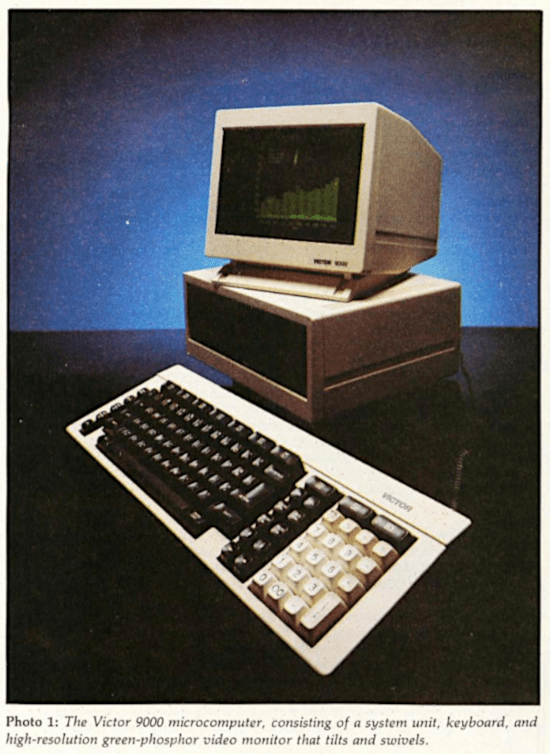
Victor’s experience has shown them that business people want a machine they can set on a desk, turn on, and use. As photo 1 shows, the Victor 9000 consists of a system unit, a detached keyboard with a coiled cable, and a monochrome monitor that can rest atop or alongside the system unit. The system unit and keyboard fit comfortably on a standard typing table, or on a cluttered desk designed before microcomputers came out. While the Apple III occupies 361 square inches and the IBM Personal Computer 420 square inches, the Victor 9000 takes up only 310. If you buy the machine directly from your local Victor branch office, Victor will deliver the machine, set it up, connect the cables, and make sure everything is working. The Operators’ Reference Manual takes it from there. It tells you how to turn on the machine and insert the user-orientation disk that comes inside the manual’s front cover. Once turned on, the machine reinforces the manual’s advice: the bottom of the monitor’s screen shows the image of a little floppy disk with an arrow indicating you should put a disk into a drive. The user-orientation disk displays a menu that leads you into explanations of how to back up the system disk, how to control the volume of the Victor 9000’s speaker, how to set the numeric keypad so that it works just like a calculator, how to use the keyboard, how to control the display, how to use the fundamental commands of the operating system, and so on. The Operators’ Reference Manual explains how to run applications programs, and each program sold by Victor has its own instructional manual. At least two of these programs have their own disk-based tutorials, too. In short, you can set the machine on a desk, turn it on, and start to use it.
Standard Equipment: Complete and Versatile
Some computer systems today are sold “unbundled,” that is, in parts. This makes the initial purchase price seem low. For example, you can buy a $1500 computer that lacks interfaces for a modem or a printer, doesn’t have enough system memory to run a major applications program, and has no high-speed mass storage at all. To be sure, you can complete such a system by ordering all the necessary components one by one, but dining a la carte is always more expensive than ordering a full dinner. If the unbundled system is an IBM Personal Computer or an Apple II Plus, the buyer can save money by buying many of the components from third-party manufacturers. But that can make it harder for owners to get service for their completed machines, mainly because the manufacturer of the system unit can’t be expected to support an add-on product.
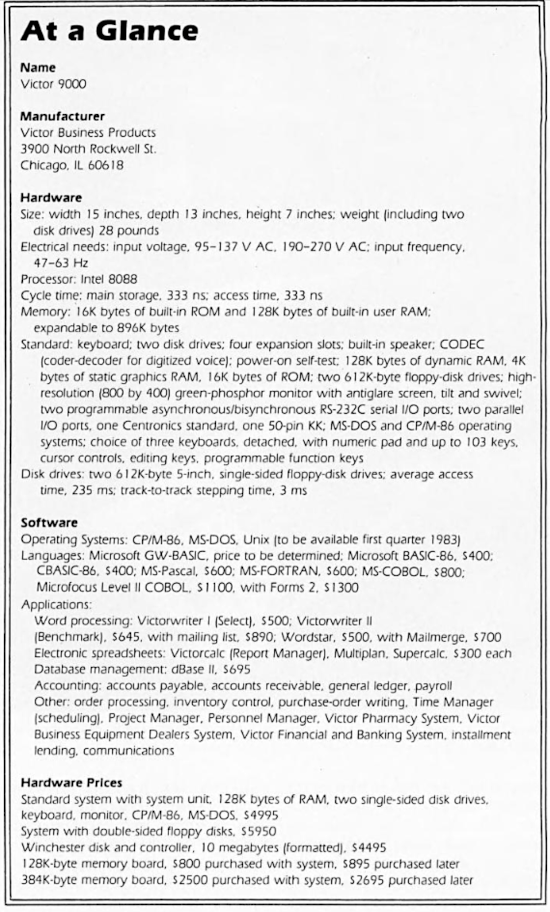
The standard Victor 9000 costs $4995. Although it is an open-bus system with slots for adding boards, the Victor 9000 isn’t just a lonely 8088 sitting in a box of empty slots and sockets. The Victor 9000 comes with 128K bytes of RAM (random-access read/write memory) on the system board, two 612K-byte disk drives, two serial I/O (input/output) ports, two parallel ports, a truly high-resolution video monitor, a choice of three keyboards with up to 103 keys, an amplifier and accompanying speaker, and a CODEC (coder-decoder) that can digitize and reconstruct a real human voice. This standard hardware configuration leaves four bus slots open. Even if you increase memory to 896K bytes, the machine still has two empty slots. The standard purchase price also includes the two most popular operating systems for the 8086/8088 processors— Digital Research’s CP/M-86 and Microsoft’s MS-DOS. Documentation is good, too. The Operators’ Reference Manual is clearly written, beautifully typeset and printed, and carefully coordinated with a menudriven user-orientation program that is the best I’ve seen. (There are hardware options on the Victor 9000; I’ll discuss them later.)
All the hardware features are flexible. In one case, the flexibility is mechanical: a cleverly designed turntable on top of the system unit enables the monitor to tilt as much as 11 degrees and swivel as much as 42 degrees in either direction. Most of the hardware is flexible, however, because it is “soft-tooled,” i.e., under software control. Every key on the keyboard can be programmed, not just the 10 programmable function keys. If you’ don’t like the typefaces displayed on the screen, you can design your own with a utility called CEDIT. The serial ports can be programmed for both asynchronous and bisynchronous communications. In the same spirit of adapting to everyone’s needs, Victor is offering a variety of applications software — more than one application program for every common major task.
The System Unit
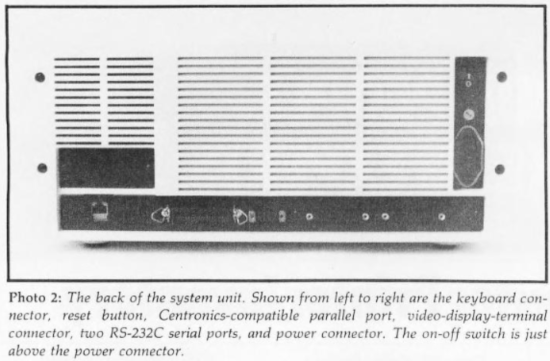
The system unit contains the main printed-circuit board, the power supply, two disk drives, a custom floppy-disk controller board, and connectors for the keyboard, the two serial ports, the monitor, and two parallel ports. Connectors for the serial ports and the keyboard and monitor are on the back of the system unit, shown in photo 2. One of the parallel ports comes out to the back of the system unit with a 36-pin connector that uses standard Centronics pin assignments. With a special 24-pin connector and appropriate software, you can use this port to connect an IEEE-488 device to the Victor 9000. The second parallel port has a 50-pin KK-type connector on the main printed-circuit board. This port, called the “user” port, is also fully programmable.
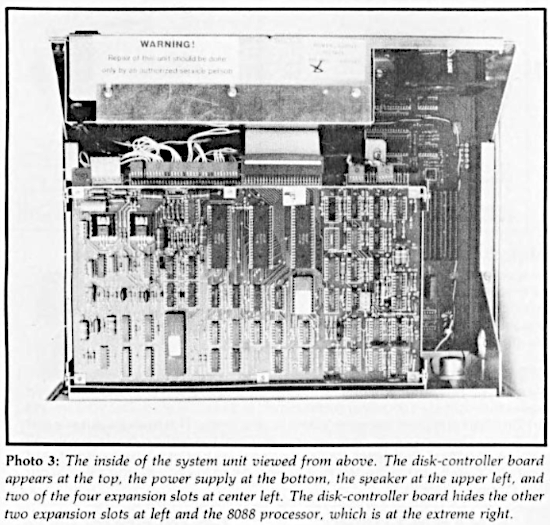
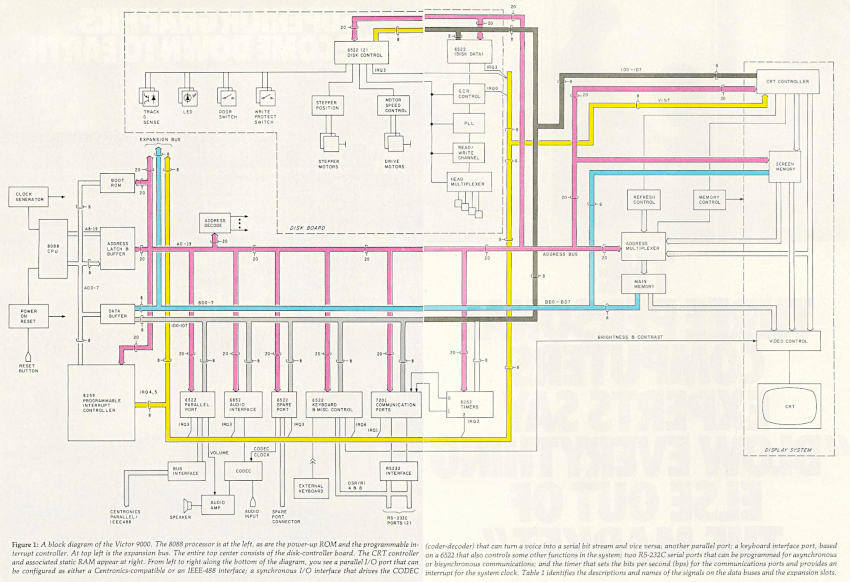
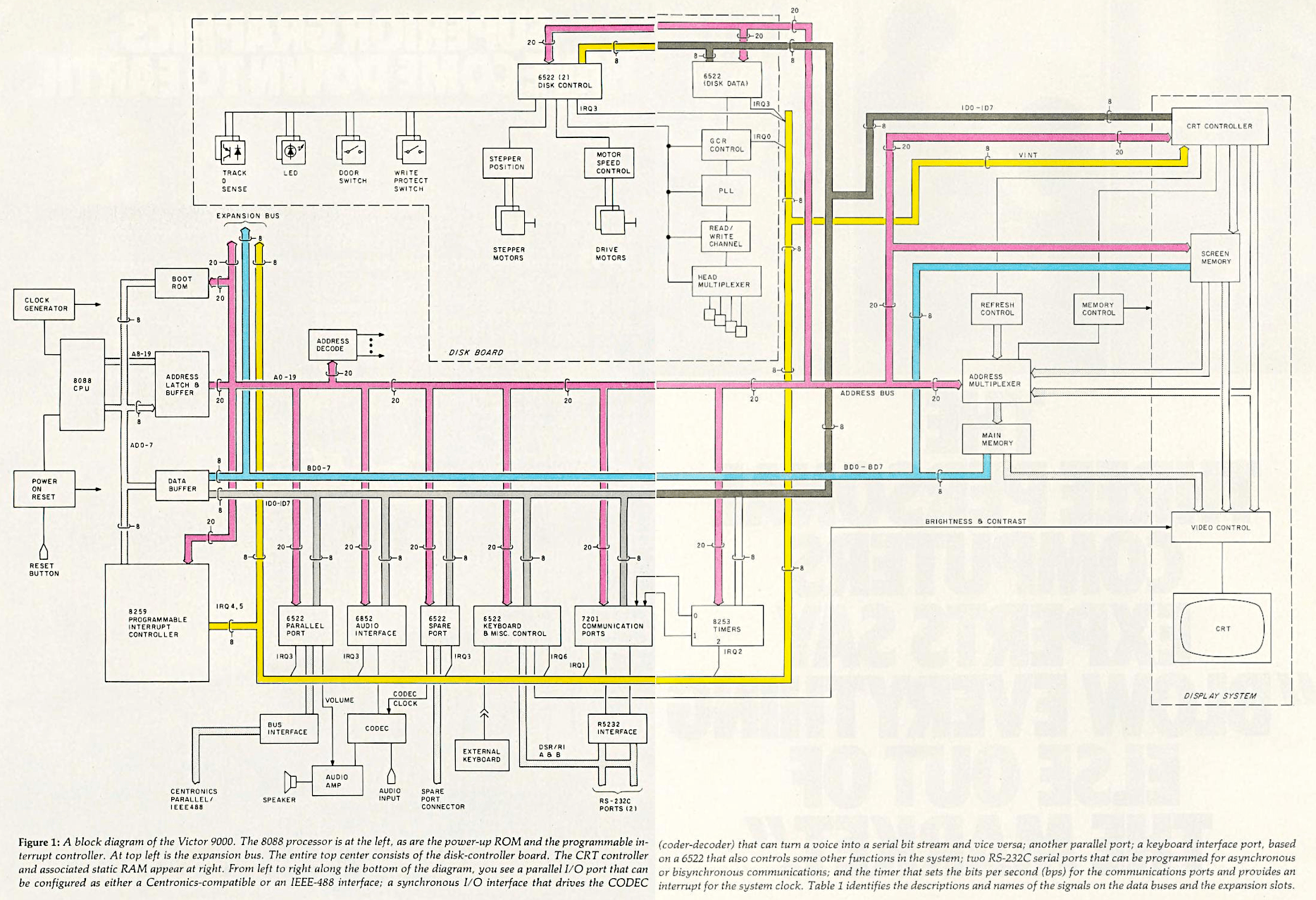
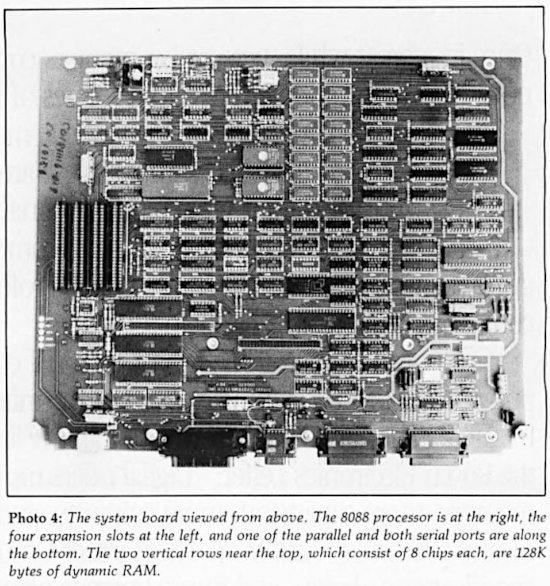
The main printed-circuit board contains an Intel 8088 microprocessor, 128K bytes of RAM in the form of sixteen 64K-bit chips (parity memory is an option), 16K bytes of ROM (read-only memory), 4K bytes of static RAM, a real-time clock, an expansion bus with four empty slots, a programmable serial-communications chip, parallel I/O chips, an 8259 programmable interrupt controller (to support real-time, multi-user, and multitasking operations), a CRT-controller chip, and the 50-pin parallel port mentioned earlier. Photo 3 shows the inside of the system unit viewed from above. The custom floppy-disk controller board hides the disk drives and most of the system board. Photo 4 shows the system board after removal of the drives. Figure 1 shows a block diagram of the Victor 9000.
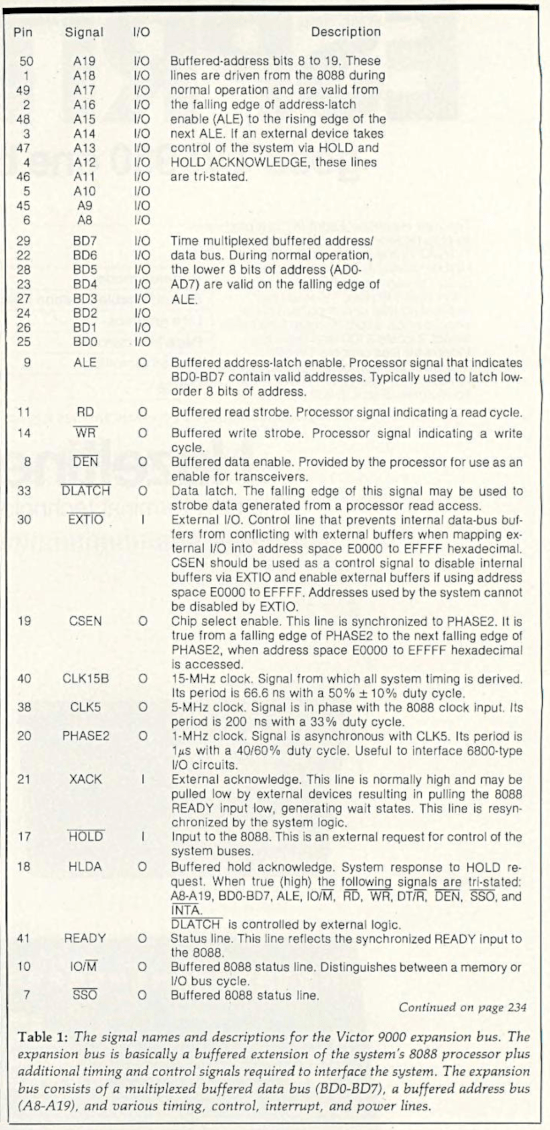
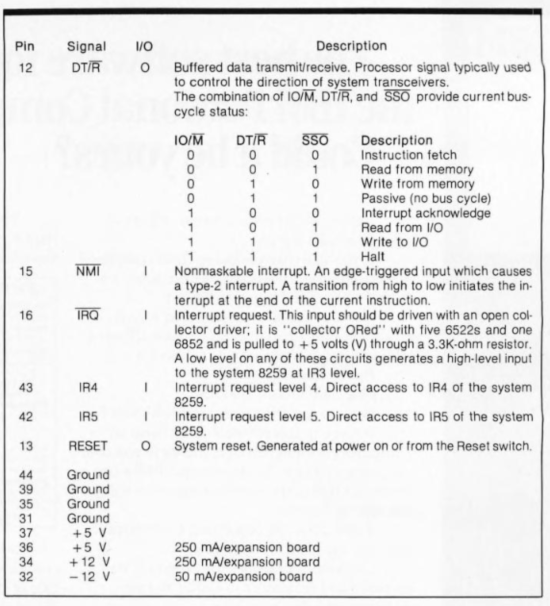
The 8088 is a 16-bit microprocessor that does all I/O 8 bits at a time. Two separate 8-bit data buses, the ID bus and the BD bus, are in use in the Victor 9000. All the Victor 9000’s LSI (large-scale integration) I/O devices (including the ones on the disk-controller board) are driven from a separate data bus consisting of lines ID0-ID7. Memory, the expansion bus (see table 1 on page 230), and the buffers for the ID bus are driven by the bus consisting of lines BD0-BD7. The programmable interrupt controller and the “boot” ROM connect directly to the processor data bus.
The system clock runs at 15 MHz and the 8088 runs at 5 MHz, or slightly faster than the 8088 in the IBM Personal Computer. The cycle time for main memory is 333 nanoseconds (ns); the access time is also 333 ns.
The 8259 programmable interrupt controller provides eight levels of prioritized interrupts, that is, signals to the 8088 that something else has to be attended to. One interrupt lets the disk controller indicate the readiness of a sector header from a disk drive; one interrupt is for the serial ports; one interrupt is for the real-time clock and other timed operations; one interrupt is for parallel I/O chips, including the chip that communicates with the CODEC; two interrupts are for the expansion bus, to be controlled by boards to be added there; one interrupt is for the keyboard; and one is for the CRT (cathode-ray tube) controller.
The 8088 can address a megabyte of memory, but the Victor 9000 uses memory-mapped I/O — that is, it addresses some of the input and output devices as if they were part of system memory. This increases the speed of I/O but reduces the amount of real memory that can be addressed. Since the 8088 can address a megabyte, however, you are unlikely to feel a pinch. Despite the memory-mapped I/O, the user of the Victor 9000 can still have 896K bytes of available RAM. Memory can be expanded with 128K-byte, 256K-byte, and 384K-byte memory boards. If you add two of the 384K-byte boards, you can have the full 896K bytes of RAM and still have two bus slots open. Besides the RAM already described, the Victor 9000 also has 4K bytes of static RAM used with the video monitor, and 16K bytes of ROM containing “sanity test” diagnostics and instructions for loading the operating system from disk.
To view a large version, click here
Mass Storage
Packing 612K bytes of data onto one side of a 5 1/4-inch floppy disk may cause jitters in people who witnessed problems in mere double-density systems only a year or so ago, but I used the drives hard during the time I had the Victor 9000 and didn’t experience any problems with the drives in any operation with either CP/M-86 or MS-DOS. One thing I did to tempt fate and strain technology was to edit and save and reedit and resave huge Wordstar text files. Even with files approaching 60K bytes, the Victor 9000’s drives performed flawlessly.
The quality and reliability of the disk drives result from the ingenuity used in designing the disk-controller board and in encoding the data. The Victor 9000 uses Group Code Recording (GCR), a technique of compressing data by squeezing out zeros. Data is encoded for storage in such a way that there are never more than two zeros in a row.
The Victor 9000 also has unusually precise control of the rotational speed of the drives. One common source of read-and-write errors is a difference in rotational speed between two drives. To achieve highly precise control of rotational speed, Victor replaced the control electronics normally supplied by drive manufacturers with a custom board that controls both drives. A microprocessor on the Victor disk board takes tachometer pulses from the drive motor and uses them to control motor speed. The board can set motor speed to any of 15 values, controlled within 1 percent. Different speed settings are used for different tracks. Why? In order to achieve constant linear speed of the media traveling under the read/write heads. When the Victor 9000 is doing disk input or output, you can hear the drive motors quietly changing speed, as if there were a 15-speed transmission inside with a gifted driver shifting from one speed to another as necessary. One benefit of constant linear speed is that the outer tracks of the disk can hold much more data. Another benefit is increased reliability.
Three 6522 versatile interface adapters (VIAs), which are special parallel I/O chips, divide most of the work of controlling the drives. Two ports on one 6522 VIA select read-and-write data; the second 6522 selects speed and controls the drives’ stepper motors; the third 6522 controls head selection and the LEDs (light-emitting diodes) that indicate drive activity and also determines the status of the spindle motors. The 8088 processor controls and monitors all the signals coming from the 6522s, besides monitoring the status of the drive doors, turning on the LEDs, and transferring data into memory.
The track-to-track stepping time is 3 milliseconds (ms) and average disk-access time is 235 ms. The Victor 9000’s operating systems use a logical sector size of 128 bytes and a physical sector size of 512 bytes.
A valuable feature for programmers who want to write disaster-proof applications software is the Victor 9000 disk system’s ability to condition an interrupt on the opening or closing of the disk drive doors. Using this feature, a program might save a user from trying to write to a drive with an open door, which, under CP/M-86 and depending on the BIOS (basic input/output system), would crash the program and lose the data that the user intended to save.
Display
The first thing that you notice about the Victor 9000 is the quality of its display. The clear definition of characters and the sharp monochrome graphics are a pleasure to the eyes. A nylon mesh minimizes glare.
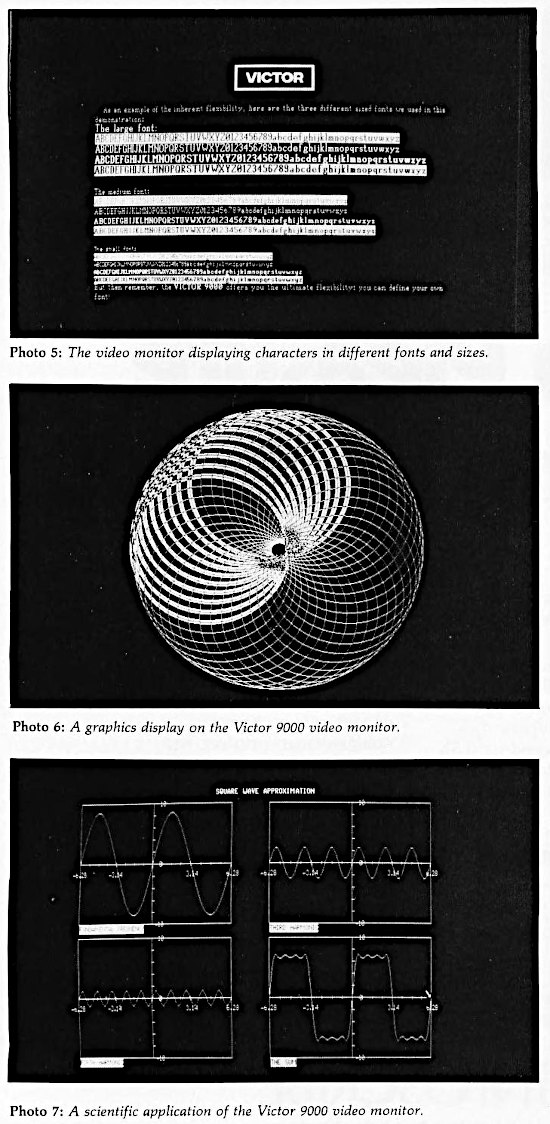
A total of 320,000 pixels (picture elements), 800 by 400, account for the high resolution. (The Apple III has graphics resolution of 560 by 192, and the IBM Personal Computer offers 640 by 200). One immediate benefit of the high resolution is the availability of a 132-column by 50-line display format for electronic spreadsheets like Victorcalc and Multiplan. The extra 52 columns and 25 lines make a large table much easier to comprehend and reduce your dependence on notoriously volatile human memory. It should be possible to have more than the standard 25 lines available for word processing, too, but the two Victor word-processing programs that I used did not take advantage of the higher resolution, nor did the third, which I saw but did not use. Photo 5 shows the Victor display with an assortment of character sets. Photo 6 gives a taste of the machine’s breathtaking graphics capabilities, and photo 7 shows a scientific application of the high resolution.
The Victor 9000 uses the Hitachi 46505 CRT-controller chip, equivalent to a Motorola 6845. A separate memory-arbitration circuit allows the CRT logic to access system memory. Together the controller chip and the memory-arbitration circuit minimize the demands made by the display on the processor and give the display logic access to the entire 128K bytes of on-board RAM.
Two hardware registers contain pointers to tell the CRT -controller chip where two tables are located in system memory. The first table is called screen RAM and the second table is called dot RAM. These two tables interact together with the CRT-controller chip to produce the display on the monitor. Just how they interact depends on whether you are in the character mode or the high-resolution graphics mode.
In the character mode, the screen RAM (which is really the 4K bytes of static RAM) acts in a manner similar to the refresh RAM of modern video terminals. The screen RAM in the Victor 9000, however, uses a 16-bit word to represent each of the 2000 character positions displayed on the monitor: 7 bits define the character according to its ASCII value, 4 bits can be thought of as font designators, and the remaining 5 bits determine the character’s attributes (underscore, reverse, etc.). In order to locate the actual dot representation of the character in dot RAM, the 11 bits defining the character and font are then combined with the pointer that points to the dot RAM by the CRT-controller chip.
Each character is made up of 16 scan lines of 10 pixels (dots) each. Dot RAM contains a pixel map of each character in the font, with a 16-bit word devoted to each of the 16 scan lines of the character cell for a total of 32 bytes per character. Only 10 bits of each scan line are actually displayed, however.
A 128-character font occupies 4K bytes of dot RAM, and multiple fonts may reside in dot RAM simultaneously. Thus the entire process is similar to that of modern video terminals except that system RAM is used instead of a fixed character ROM.
In graphics mode, however, the process is different. When graphics mode is entered, the screen RAM is loaded with data so that the CRT-controller chip is forced to cycle through 1250 consecutive “character” cells in dot RAM. Because the dot RAM is actually system RAM, you can then use this 40,000-byte area (1250 cells, 32 bytes per cell) as a bit map for high-resolution graphics, with each of the 320,000 bits being individually addressable.
The Victor 9000 can display characters in half intensity, in reverse video, underscored, or blinking. Brightness and contrast of the screen as a whole are also under software control. Applications programs should therefore be able to manipulate these factors, and the Victor operating systems themselves enable you to adjust brightness and contrast from the keyboard. While software control of brightness and contrast could be useful for achieving special visual effects, I found myself wishing for plain, old-fashioned contrast and brightness knobs on the monitor. Whenever you load the operating system, it resets brightness and contrast to its own default values. Presumably these default values could be altered to suit individual taste, but otherwise you have to enter a few keystrokes (pressing the Alternate key along with the Brightness key and the Contrast key) to adjust the monitor whenever you reload the system. This becomes a minor annoyance if you’re in a hurry.
I/O Ports
The two standard RS-232C serial ports on the Victor 9000 have remarkable versatility. The Intersil 7201 programmable communications chips can support full-duplex asynchronous communications, as can most serial ports on other microcomputers. But the 7201s can also support both bisynchronous communications and SDLC (synchronous data link control), a special kind of bisynchronous communication. Software determines which type of communication the ports will perform and at what speed (up to 19.2 kbps for asynchronous operations, and up to 56 kbps for bisynchronous). The significance of the Victor 9000’s use of 7201 chips is that you will probably never have to add a special board to communicate with another computer, even if your company switches from IBM to DEC mainframes or vice versa.
The 6522 parallel ports (designer Peddle’s favorites) are also programmable. Certain pins can be selected for use as interrupt signals. As noted earlier, one port has a standard Centronics-compatible 36-pin connector. A special 24-pin connector and appropriate software can turn this port into an IEEE-488 interface. The second parallel port has a 50-pin KK-type connector on the main printed-circuit board. This port, called the user port, is also fully programmable.
Keyboard
The Victor 9000 has a separate keyboard connected to the system unit by a coiled cable that is long enough to let you hold the keyboard in your lap if you wish. A still longer cable (12 feet) is available as an option. Three keyboards with up to 103 keys, all sculpted and most with auto-repeat capability, are available and have a soft touch that is easy to adjust to. Victor gives its distributors a utility program, KEYGEN, that programs the keyboard without requiring knowledge of 8088 assembly language. That should make it possible for distributors to tailor the keyboard for any application that a (unclear) owner happens to have. For that matter, since the key caps are easy to rearrange, you could replace the standard QWERTY keyboard layout with the Dvorak (see “A Short History of the Keyboard” by Phil Lemmons in this issue, page 386), and the calculator-style numeric pad with the more efficient push-button telephone arrangement.
Three principal models of the keyboard are available: one for programmers, one for word processing, and one called “standard.” Some of these leave 7 programmable keys free, some leave 10 free. But these three models are only the beginning. Like almost everything in the Victor 9000, the keyboard is “soft-tooled.” An 8048 8-bit microcomputer, which has its own ROM, translates the output of each key. Pressing or releasing a key causes the generation of a code corresponding to the key’s location. The 8048 constantly scans the keyboard to detect changes in the state of any key. When the 8048 sees a change, it generates an 8-bit code. Seven bits identify the key, and the other bit indicates the key’s new state. The data is sent serially to a 6522 parallel I/O processor that interrupts the central processor after receiving 8 bits. The 8088 performs final interpretation of the keystroke using the keyboard table produced by the KEYGEN utility and then incorporated into the operating system.
Victor’s system-generation software enables you (or Victor distributors and offices) to construct versions of the operating systems that incorporate different tables of keyboard values. Several standard tables to support specific applications packages exist, such as a table that programs the keyboard for Wordstar, and Victor’s software-support people can construct more keyboard tables as the library of software grows.
It is conceivable for two people, one using the QWERTY keyboard and the other using the Dvorak keyboard, to share the same machine without coming to blows. In order to avoid having to move the key caps around at every change of user, the two people would have to have one keyboard each. All they would need then would be two different versions of the operating system, one incorporating each person’s favorite keyboard table. Just plug in one keyboard and load one operating system, then unplug the first keyboard, plug in the second, and load the second operating system. The change would take less than a minute.
To sum up, the Victor keyboard has lots of keys and unsurpassed adaptability.
Software
Operating systems: Both CP/M-86 and MS-DOS come with the machine at no extra charge. Each is approximately 40K bytes in size. Victor is promising to offer Unix for the Victor 9000 sometime in the first quarter of 1983. The company is planning to demonstrate it at COMDEX (Las Vegas) later this month.
Languages: Victor offers Digital Research CBASIC-86, Microsoft GW-BASIC, Microfocus CIS-COBOL, Microsoft COBOL, Microsoft FORTRAN, and Microsoft Pascal. GW-BASIC (GW for Gee Whiz) is an enhanced version of Microsoft BASIC-86. It is the BASIC that runs on the IBM Personal Computer. Gregg Williams discussed it in his January 1982 BYTE article “A Closer Look at the IBM Personal Computer” (page 36). The Victor version of GW-BASIC implements all the commands listed in that article except On Pen and On Strig. (On Pen enables handling input from a light pen. On Strig does the same for a joystick.) Victor GW-BASIC maps the color-related commands on the IBM Personal Computer to levels of intensity on the Victor monochrome monitor.
Microsoft FORTRAN is an implementation of FORTRAN 77 and requires 256K bytes of RAM. CIS-COBOL from Microfocus (with Forms 2, Level 5) is an ANSI (American National Standards Institute) high-ntermediate-level version of COBOL and runs in a 128K-byte CP/M-86 system. MS-COBOL is an ANSI intermediate-level implementation of the language and requires MS-DOS and 128K bytes of RAM. CBASIC-86 runs under CP/M-86 and requires 128K bytes of memory. GW-BASIC requires the same amount of memory and MS-DOS. MS-Pascal runs under MS-DOS and requires 256K bytes of RAM.
Applications software: The applications software available directly from Victor for the Victor 9000 must set some kind of record. A variety of software ultimately becomes available for every popular microcomputer, but Victor is itself providing a variety of correctly installed software from the beginning. Taking into account the variety of human taste, Victor is offering more than one program for the three kinds of major applications that almost everyone needs: word processing, electronic spreadsheets, and database manage- ment.
For word processing, Victor offers three different programs: Victorwriter I (Select, from Select Information Systems), Wordstar (from Micropro), or Victorwriter II (Benchmark, from Metasoft). Select is easy to learn, but Wordstar seems to me to do more and run faster. I haven’t used Benchmark but I’ve seen it in use, and it seems to rival Wordstar.
Victor also offers three electronic spreadsheets: Victorcalc, a version of Report Manager (from The Image Producers), which has an optional training disk; Multiplan (from Microsoft), said to be quite powerful; and Supercalc (from Sorcim), noted for its very effective HELP feature.
At this writing, Victor is shipping only one database management program, dBase II (from Ashton-Tate), but Victor promises a second database manager soon. Condor Computer Corporation does offer its Condor Series 20 DBMS for the Victor 9000.
Victor also offers the following software: accounts receivable, accounts payable, general ledger, payroll, order processing, inventory control, purchase-order writing, time-management, project management, pharmacy management, financial and banking, installment lending, and software for managing a Victor dealership. As you can see, Victor is pursuing some “vertical” markets (specialties such as pharmacy) as well as the “horizontal” markets (general applications such as accounting and word processing).
Both bisynchronous and asynchronous communications software are on the way, too.
Performance in BASIC
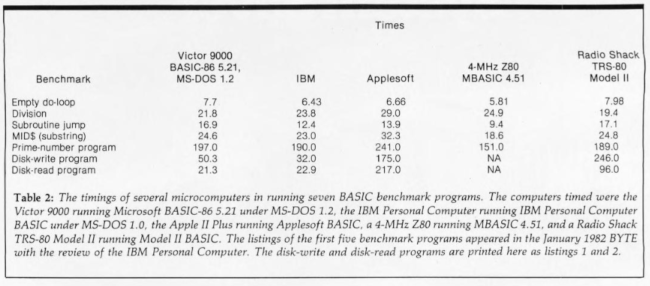
I was hoping to have a running version of GW-BASIC on the Victor 9000 in time for this review in order to run some of BYTE’s benchmark programs. GW-BASIC may be available as you read this. (Microsoft is still adding enhancements.) Rather than wait, I ran the benchmark tests under the version of Microsoft BASIC-86 that Victor was using to write some of its utilities and demonstration programs. While the resultant timings of the Victor 9000 probably give a rough idea of the Victor’s capabilities, you have to keep in mind that the BASIC used was not the standard interpretive BASIC for this machine. Also keep in mind that the timings for the IBM Personal Computer were done with IBM BASIC, a version of GW-BASIC and not the same as the BASIC used on the Victor 9000 in these tests. Both the IBM Personal Computer and the Victor 9000 have 8088 processors; the IBM runs at 4.77 MHz, the Victor 9000 at 5 MHz. The two systems have different disk drives and controllers, which may account for the differences in disk I/O benchmarks. I’ve run the benchmarks on the Victor 9000 under MS-DOS, since IBM Personal Computer DOS is an installation of MS-DOS, in order to avoid further confusing the issue. Of course, the two different installations of an operating system that is fundamentally the same can also leave room for differences in performance.
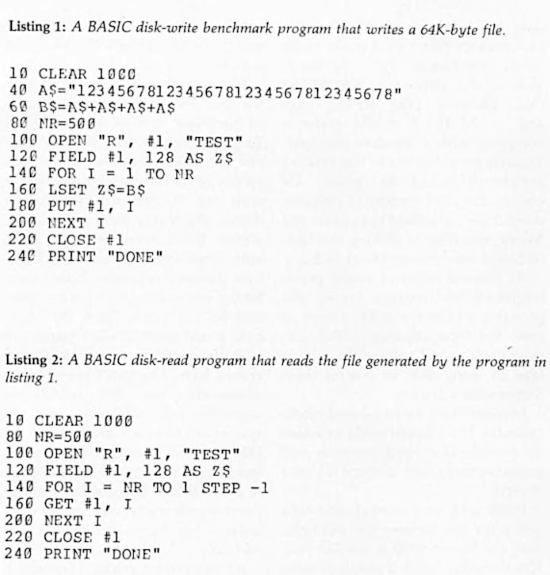
Having offered all the foregoing caveats, I can at last refer you to table 2, which shows the Victor 9000’s performance, alongside that of several other popular microcomputers, in seven benchmark BASIC programs. The first five benchmark programs are listed in Gregg Williams’s article in the January 1982 BYTE. Listings 1 and 2 give the sixth and seventh programs. The Victor 9000 performed comparably to the IBM Personal Computer — a little slower on the empty do-loop, a little faster on division, a little slower on the subroutine jump, about the same on the string operation, and a little slower on the prime-number program. There is no dramatic difference between the IBM Personal Computer, the Radio Shack Model II, and the Victor 9000 in the computational benchmarks. The 4-MHz Z80 system still does best overall!
However, dramatic differences in the disk-write and disk-read benchmarks do exist. The Victor 9000 writes a 64K-byte file in 50.3 seconds, almost 3 1/2 times faster than an Apple II and almost 5 times faster than a TRS-80 Model II. The Victor 9000 reads a 64K-byte file in 21.3 seconds, roughly 10 times faster than an Apple II and 4 1/2 times faster than a TRS-80 Model II. The IBM Personal Computer is even faster than the Victor 9000 in the disk-write test— 32.0 seconds compared to 50.3 seconds. But the Victor reads the disk to verify the data after writing to disk; the IBM does not. Subtracting the Victor’s read time (21.3) from the write-and-read time (50.3) gives a “write-only” time of 29 seconds, or 3 seconds faster than the IBM Personal Computer. In the disk-read test, the Victor is almost 2 seconds faster than the IBM Personal Computer.
Here is evidence that the IBM Personal Computer and Victor 9000 really do represent a new generation of microcomputer. In terms of computation, the two 8088-based systems don’t significantly outstrip their competitors, but in disk I/O, none of the other computers comes close to the Victor or the IBM. Whatever the reason — the direct memory access (DMA), something about the processors, or a generation’s experience in design — the Victor 9000 and the IBM Personal Computer leave prominent 8-bit systems shown in the table far behind even though the 8088 does I/O 8 bits at a time, too.
Given the truism that most programs are “input/output bound”— that is, I/O is a more important factor in their overall performance than is speed of computation — the choice narrows to the IBM Personal Computer and the Victor 9000. And then the choice depends on whether greater storage capacity or faster disk output is more important to you. The Victor 9000’s verify-after-write disk I/O accounts for its being about a third slower than the IBM Personal Computer in disk output but also helps ensure reliability because the Victor packs almost 4 times the storage of the IBM on disks of the same size.
Marketing and Distribution
Victor is supplementing its own 50 branch offices with many independent Victor 9000 dealers. The existing network of branch offices gives Victor an edge over most of its competitors. Victor has an edge over IBM, ironically because of something that Victor doesn’t have — comparable but more expensive computers whose sales must be protected. While IBM (at least, at the IBM Product Centers where I’ve asked) tells people to buy a Displaywriter if they want letter-quality output and a first-rate word-processing program, Victor is eager to sell good word-processing programs and to sell and interface a letter-quality printer.
Maintenance and Support
Victor is offering three types of maintenance service: you can carry your system to a Victor service center, have Victor send a messenger to swap a failed component, or have Victor send a technician to repair your system on the spot. This surpasses IBM’s service offerings, which had set a new standard for the industry little more than a year ago.
Victor’s 50 branch offices are gearing up to provide software support as well as hardware maintenance. Because Victor will be the source of so much software on its own machine, software support should be easier for Victor than for most companies. Furthermore, the soft-tooled design of the Victor 9000 makes it easier for Victor than for any other company at this writing to adapt its system to new software.
The Victor branch offices also sell all the necessary supplies for the computer— paper, print wheels, disks, cables, dustcovers, etc.
Finally, Victor has a toll-free number to help dealers with any problems in Victor-released software and another toll-free number for technical support.
Optional Hardware
Victor is now offering both double-sided floppy-disk drives, increasing storage to 2.4 megabytes, and a separately housed Winchester hard disk, providing 10 megabytes (formatted) of storage.
For those who have too much invested in the 8-bit world to say good-bye, Victor will recommend a Z80 Executive Card that runs CP/M 2.2 (8-bit) programs without modification.
Victor also sells a full range of printers — letter quality (40 characters per second), inexpensive dot matrix (80 cps), and high-speed dot matrix (400 cps).
Reservations
I do have a few reservations about the Victor 9000; there’s always something. In principle, I would prefer a computer with an 8086 and a 16-bit data bus. How much difference in performance this would really make we still don’t know. [For some indication of the difference, see BYTE’s Bits, October 1982 BYTE, page 468. . . . M. H.] I would prefer a computer with a standard bus, particularly the S-100 bus so that existing peripherals could be added. Of course, the IBM Personal Computer doesn’t use a standard bus either, and Victor, like IBM, is making available technical information about its bus.
As I noted earlier, I would prefer brightness and contrast knobs, and probably a knob for audio volume as well. But these are truly trivial considerations, and I can see the advantage of being able to control these things with software.
I would like a battery-based clock-calendar, but a board could be added to provide that, and someone will probably make such a board if Victor doesn’t.
If life without a joystick and light pen is for you without joy and light, then the Victor 9000 is not for you. (On the other hand, if you love these sensory I/O devices, you would probably find the CODEC so fascinating that you wouldn’t rest until you’d taught the machine to yodel.)
You might fault the Victor 9000 for not having standard CP/M-format 8-inch floppy disks, but few new systems do, and Victor deliberately chose 5 1/4-inch drives to keep the system’s “footprint” small and packed in the data to provide double the storage of a standard CP/M single-density 8-inch disk.
My only serious reservation about the Victor 9000 concerns the pricing of hardware options and software. The basic system price is better than fair, especially because of the versatility of the standard hardware. But with the double-sided floppy-disk drives, the Victor 9000 costs $5950, almost $1000 more than the price with single-sided drives. The 128K-byte memory expansion board costs $800 if you order it with the machine, and $895 if added later; the 384K-byte board costs $2500 if purchased with the machine, and $2695 if purchased later. The $4495 price for the 10-megabyte hard disk includes the controller but still seems high. So many hard disks are available for the IBM Personal Computer for so much less money. (Of course, none of those is from IBM.) No doubt, if third-party suppliers start offering alternate sources for hardware, these prices will drop.
As to software prices, Wordstar is $500 and Mailmerge is an additional $200; Victorwriter II (Benchmark) is $645, and its mailing-list program is another $245. Victorcalc, Supercalc, and Multiplan each cost $300, which seems reasonable but not aggressive. The price of dBase II is $695, and that seems reasonable but not aggressive. In my opinion, more aggressive marketing through lower software prices would help Victor gain a wider market and establish itself as a computer company.
The other side of the coin is that Victor does have the cost of maintaining its branch offices and a high level of support. Both Sirius Systems Technology (which, in collaboration with Victor, is marketing internationally the Victor 9000 under the name Sirius I) and Victor have large and busy software staffs installing three operating systems and dozens of applications programs. Who else is doing as much?
Conclusion
The Victor 9000 is an excellent microcomputer. The available service and support and the machine’s ability to fit on a typing table make the machine ideal for the business market. The “soft-tooled” hardware makes the machine adaptable to unforeseen external changes (such as your company’s home office changing mainframe computers and expecting you to be able to communicate with the new one). The keyboard has a good feel, ample keys, and adaptability that approaches the limit of logical possibility. The video monitor would make your eyes applaud if anatomy permitted. Mass storage is ample and reliable. The Victor 9000s abundance of standard hardware means that your four expansion slots are really free; even with 896K bytes of RAM, two slots remain free. You could have all that memory, a Winchester controller, and a network interface board without the added bulk and expense of an expansion chassis. The company is offering a remarkable range of software, including more than one program for word processing, spreadsheet calculations, and (soon) database management.
You can personalize the computer with the utilities for programming the keyboard and designing character fonts for the display. The CODEC voice-output system stimulates the imagination, especially when and if an input board comes along. Will Victor design software that enables the Victor 9000 to read a letter aloud in a real human voice while you proofread the final copy? Will the Victor 9000 support spoken electronic mail? Will Victor enhance the time-management program with polite spoken reminders?
Given the choice between an IBM Personal Computer with two of its standard floppy-disk drives and a Victor 9000 with two of its standard floppy-disk drives, I would take the Victor 9000. The Victor is clearly superior in quality of display, amount of standard memory, standard number and versatility of I/O ports, and number of available expansion slots. The prices of Victor’s memory boards and Winchester disk, however, would give me pause and may hamper Victor’s marketing effort.
Finally, two intangible reasons for buying a Victor 9000 deserve mention. First, the Victor 9000 is everything to Victor Business Products, not the “low end” of a long line of computers. Second, owners of the Victor 9000 will have the pleasure of knowing that new products and enhancements for their machine will be coming from a design team headed by Chuck Peddle. ■