Information Appliance: The Next Revolution?
from the November 1985 issue of MicroTimes magazine
Jef Raskin believes that computers should be easy to use. How easy? Well, he calls his company Information Appliance, and favors computers as hassle-free as toasters.
By contrast, Raskin says, the current state of the industry more closely resembles a scenario conjured up by Douglas Adams (of Hitchhiker’s Guide To The Galaxy fame). “Adams was describing some imaginary product of the future, and he said that people get such a sense of achievement from having mastered it that they forget how useless it is. I think that’s really a key problem in the industry today — a person works on the computer and they get all this mastery, and they just forget all the little gut-wrenching annoyances they went through when they used it first.”
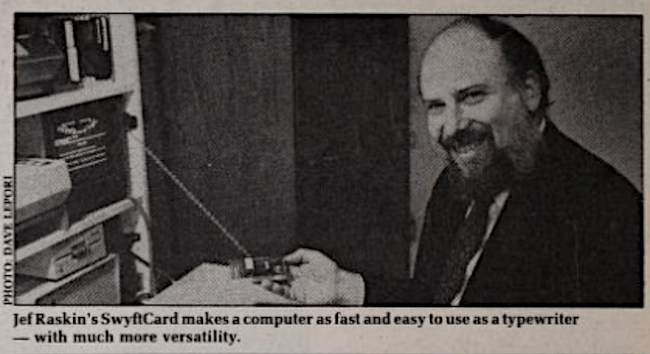
Raskin, be it duly noted, is not your basic unregenerate technophobe. Among other things, he conceived the idea for Macintosh, named the machine and assembled its first design team. Perhaps because his earliest work in the field had to do with writing documentation — i.e. rendering the machine comprehensible to the user — simplicity and utility were his chief concerns: “I came into this industry not as a hardware or software hacker, but as a writer,” he recalls. As a consequence, he often found himself challenging commonly-held assumptions; he recalls an early disagreement with the Powers That Be: “They were doing this INIT program to format a disk, and I said, ‘Well, why don’t you just take a look at the disk display, do the initialization, don’t even tell the user you’re doing it, just go ahead and do it.’ And they said, ‘That’s not the way it’s done.’ "
In its current incarnation, says Raskin, the Macintosh doesn’t approach the ease of use he had in mind. So, when he left Apple in 1982, he formed his own company with the intention of bringing some of his original ideas to fruition. Information Appliance’s first offering is SwyftCard, an $89.95 card that plugs into one of the Apple lie’s slots and allows the machine to perform word processing (including printing and mailmerge), information retrieval, telecommunication and calculation functions as simply and intuitively as if, to use one of Raskin’s favorite analogies, Maytag had finally built a computer.
Take word processing. You sit down at your He. You turn the machine on. The screen lights up immediately. You type in whatever your heart desires — say, tonight’s grocery shopping list. You hit the key assigned to the Print command (there are only five commands SwyftCard uses). As fast as your printer can do it, your document is there. “Isn’t that extraordinary?” says Raskin sardonically. “Computers as fast as an electric typewriter.”
Suppose you want to save that grocery list. No problem — take a nice blank diskette and put it in the disk drive (in case you missed this aspect of the situation, everything you’ve done up to this point has required no software whatsoever). Uh-oh, you don’t have any formatted diskettes. Once again, no problem. Put that blank unformatted diskette in the drive, hit Disk (another command), and, literally before you can blink, the disk is formatted and your data safely stored thereon. You can also use a diskette that you’ve previously used with SwyftCard. If, by some chance, you inadvertently put in the diskette for Music Construction Set instead, SwyftCard immediately recognizes that this is a foreign diskette, turns itself off and puts you right back in Apple’s operating system.
Which brings up the matter of operating systems. SwyftCard doesn’t have one. “It’s totally unnecessary,” maintains Raskin. “That’s one thing I’ve believed for years. I’ll give you my definition of an operating system. An operating system is that program you have to wrestle with before you wrestle with the application program. They are a nuisance.”
So you’ve saved the shopping list. You proceed to get on with your work. After several hours have gone by, you discover that you’ve lost your printed-out copy of the list (or perhaps the dog ate it). You don’t remember the file name, or even if you remembered to name it. What you do remember is that it called for hamburger. Enter SwyftCard ’s information retrieval function. Depressing one of the Leap keys (there’s one for forward and one for backward), type in “hamburger.” Again instantaneously, the screen displays the closest block of text containing the word “hamburger.” If it isn’t the right text, leap again until you get there. Also, if your memory is a little fuzzy as to where the document in question is on the diskette, SwyftCard will search the whole diskette automatically (i.e., if what you want isn’t really forward, it’s backward, SwyftCard will look in both directions). And if it isn’t there, SwyftCard will search the diskette and then return to your position in your current document. This works equally well if you’re in the middle of a letter and have to find Aunt Mildred’s address — SwyftCard indexes every character or word in every document. And the information is retrieved instantaneously, without disk swapping, opening and closing of files, or other cumbersome procedures. And although Swyft-
Card gives you the option of using various formatting commands when you print your document, it doesn’t require you to use them — it prints the document exactly as it appears on the screen.
Other functions are just as easy. You can perform mathematical calculations as the need arises, without leaving the document you’re working on. You can communicate with networks like The Source or CompuServe without having to deal with their editor functions; data are upand downloaded directly between the network and SwyftCard’s editor. Also, if you have documents that you’ve already created on your Apple using ProDOS software, and you’d like to work on them with SwyftCard, you’ll be glad to know that the card is able to convert ProDOS files to SwyftCard files and vice versa, 40K at a time.
There are a few inherent limitations, storage being one of the obvious ones. Essentially, the capacity of the memory is the same as the capacity of the diskette, so if you’re writing the Great American Novel you’re going to need a lot of diskettes. And Raskin points out that SwyftCard doesn’t do spreadsheets, have exotic fonts and formatting capabilities for typesetting, or play games. However, SwyftCard makes it extremely easy to use a computer for most of the reasons an individual or small business would buy one for; it was extensively tested by 1500 home, education and business users before being released last month, and various businesses are using it quite happily (including Information Appliance, which performs all office operations except spreadsheets with it).
“Every other project I’ve worked on [for other people] has gotten more and more complex, much to my disgust and horror,” says Raskin. “On this one, now that I’m CEO of the company, I can say ‘No, SIMPLICITY!!!’ That’s the aim of this company.” And while he’ll admit that there are other projects in the works at Information Appliance, he won’t say what they are. “We don’t talk about unannounced products,” he says. “We never even talked about this before it was available. Yes, we’re going to do other things in the future. Yes, we have some really nifty things we’re working on. People make all kinds of guesses. And we’re not going to say.”
Raskin remains cautious about the card’s impact on the rest of the industry— “Remember,” he observes, “that icons and windows were around for ten years before anybody used them in any commercial product.” Still, it seems rather likely that SwyftCard’s radically simple interface will send lots of manufacturers and developers back to the drawing board. It may also make the Apple He the machine of choice for victims of computer terror in search of efficient tools. “You want to get the idea from your head onto the paper,” says Raskin. “You want it to work every time without failure, and fast. Get it done — that’s the whole idea. We’re practical people. For people who need toys, for people who want toast in 15 colors of red, fine. Use Macintosh or IBM PC. But if you just want to get the job done, nothing in the world is as fast or as easy to use as this. Period.” (Information Appliance Inc., 530 University Avenue, Palo Alto, CA 94301, (415)328-5160.) □